
How to generate images using Artificial Intelligence
This page provides an overview of Artificial Intelligence (AI) image generation, the models that power it, a practical introduction to using Google Gemini for visual content creation, and an overview of the critical issues with AI image generation.
What is AI image generation?
AI image generation is a form of Generative AI (GenAI), part of the wider field of artificial intelligence (AI). They are systems designed to create new content, rather than simply analyzing existing data.
AI image generation takes a request from a user (a text prompt) and uses highly complex algorithms to produce a brand-new, unique image that matches that description.
The AI does this by drawing on patterns, styles, and concepts learned during its training on massive datasets containing billions of images and their corresponding text captions. The output image is a sophisticated statistical prediction of what the text prompt should look like.
It is important to note that while GenAI can create highly complex work that looks original in nature and unique, it is still deriving its output from work created by humans and would not be able to produce such work without the creative endeavours of millions of people, as well as the archiving and preservation efforts made by individuals and institutions.
Critical GenAI Literacy and AI generated images
AI-generated images illustrate the remarkable intersection of nearly all of the critical issues with generative AI.
Critical GenAI literacy is a way of approaching GenAI that critically considers how these technologies are being developed and used.
Critical GenAI literacy sees GenAI as being as much of a socio-economic and cultural phenomenon as it is a technology and uses a "socio-technical" perspective.
Here are some of the structural issues with GenAI and concerns with its applications specifically applied to AI-generated images.
No real world understanding
GenAI tools base their outputs purely on the statistical associations deriving from their training data and the algorithms used to interpret these.
GenAI image tools are no different and they do not have any real world semantic understanding of the images they create.
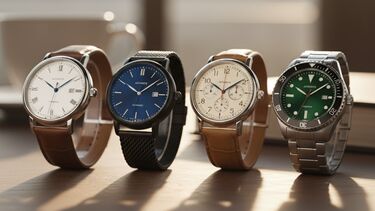
For example, if you ask Gemini to generate an image of a series of watches showing it is 4:30 (or any other time), it will produce watches showing invariably 10:10 or around that time. This is because it is the universal convention in adverts agreed by watch producers. It is considered aesthetically pleasing and appealing as it shows balance and symmetry, and offers a clear view of the brand's logo and other features.
Gemini (and other GenAI tools) have no real world understanding of how watches work or the concept of time, they are unable to generate images that deviate from their training data scraped from the internet containing watches predominantly set around 10:10.
GenAI tools show no semantic understanding and they blindly follow the statistical frequency in their training data.
To explore the topic in more details, see:
Lack of real world understanding IN Critical GenAI Literacy (online tutorial)
Bias and stereotypes
GenAI tools are trained on data created by humans and any biases and stereotypes present in it will be reflected and even amplified in the generative AI’s outputs.
How these biases and stereotypes can be displayed and magnified can be most clearly seen in examples from AI image generation tools.
In 2023, Leonardo Nicoletti and Dina Bass from Bloomberg Technology + Equality conducted an investigation into biases in GenAI text-to-image tools and found that “humans are biased and Generative AI is even worse” as it amplifies stereotypes about race and gender.
A 2023 Rest of World investigation demonstrated how AI image generation tools exhibited biases and stereotypes when it portrayed images of people from different countries and cultures.
These inquiries are few years dated now and AI companies have been keen to try and address these biases.
Whilst these tools are being improved and mitigations and guardrails are introduced, they still demonstrate how biases can be inherent and structural features within AI image generation platforms.
Look at the following examples - Can you spot any biases or stereotypes? Have a go yourself with asking Gemini to generate images of people with different jobs, of different nationalities, or ages.



To explore the topic in more details, see:
Bias IN Critical GenAI Literacy (online tutorial)
Environmental impact
It is difficult to get an accurate picture of the real environmental impact of the AI industry.
Data on the subject is complicated and contested for water use, energy consumption, and CO2 emissions.
It is fairly accepted that a query in a search engine will have less environmental impact than a query in a GenAI chatbot.
However, on the other side of the debate, the energy costs of individuals' use of GenAI tools can be considered minor, compared to other large scale demands on our energy resources.
One thing which we can be fairly certain about is that certain uses of GenAI are more energy intensive than others and AI image generation is one of these.
See the viewpoint of an artist who works with AI:
To read more about the topic, see:
Sustainability and environmental impact IN Critical GenAI Literacy (online tutorial)
Copyright
The recent rapid developments in GenAI pose some very crucial challenges to existing copyright legislation. These raise important issues around legality, ethics, and broader societal impact. And, again, examples from AI image generation tools illustrate these very poignantly.
There are two main aspects to consider:
- Use of copyrighted data to train GenAI tools.
- The copyright status of GenAI outputs.
There is no doubt that the data sets used to train GenAI tools involved copyright-protected material including billions of images, photos, and artworks. If this is considered infringement or not is not clear, but a wave of lawsuits have been filed against AI companies since the launch of ChatGPT in 2022.
Visual arts creators all over the world had their work used by the AI companies without permission or payment and they have very real concerns that generated AI outputs will undermine their livelihood and devalue the skill of professional illustration.
There are also uncertainties about the copyright status of GenAI outputs and you should check the "terms and conditions" for any GenAI tool that you use, if you are concerned about who owns the copyright from its output.
To learn more about this topic, see:
Ownership and copyright IN Critical GenAI Literacy (online tutorial)
GenAI and creativity
We are well used to using technology to enhance human creativity, in the visual arts and musical fields, for example. Is the use of GenAI actually any different?
There is much debate whether GenAI tools are actually capable of creativity, but it may be that is not the most helpful question to ask.
As users, we do not want GenAI tools to replace our human creativity, but to support and enhance it. There is no substitution for human creativity and human authorship, but GenAI tools can be just “tools”.
To explore more about this issue, see:
AI and creativity IN Critical GenAI Literacy (online tutorial)
Misinformation
GenAI tools have made it easier than ever to create false information with the intention to mislead people. Fake and manipulated images are some of the most common kinds of misinformation found online.
A very concerning phenomenon is that of deepfakes (from deep learning and fake). They typically show someone doing or saying something they did not do.
The term “deepfake” was first used in reference to non-consensual intimate images targeting women. Since then, the majority of harmful deepfakes predominantly target women, as in deepfake revenge porn, and promote misogyny and harmful gender stereotypes.
However, deepfakes can have legitimate uses which are not always harmful or illegal - for example in entertainment, advertising or education.
While GenAI may not have introduced entirely new problems, it has the potential to amplify existing ones.
Overall, the use of GenAI to create misinformation, and deepfake images has an insidious impact by eroding trust and reducing our ability and motivation to distinguish truth from misinformation.
To get to know more about this topic, see:
Misinformation, fake news, deepfakes and "AI slop" IN Critical GenAI Literacy (online tutorial)
AI Slop and oversaturation
AI slop is AI generated content typified by a lack of effort, quality and meaning, and by a high volume of production.
The overall effects of being exposed to nonsensical and meaningless AI generated content can lead to being overwhelmed, bewildered, and desensitised.
Everything can start to feel both too real and completely unreal. This kind of low quality information oversaturation can distort our sense of reality.
For more details, see:
Misinformation, fake news, deepfakes and "AI slop" IN Critical GenAI Literacy (online tutorial)
Things to consider when creating GenAI images
- Do you need to generate an image using GenAI?
You shouldn't generate AI images just because you can.
- Are there sources of images that you can freely use?
You can find Creative Commons images that you can legally reuse with proper attribution from Openverse.
- Can you create your own images?
You can create images yourself by taking photos, drawing your own illustrations, or creating your own graphs. If you do this, you will own the copyright and you will have full control over it.
Think about using AI-generated images in the right contexts and with careful consideration of the appropriateness of outputs, including the potential impact of biases embedded in the image.
If you do use them, clearly label that the image is AI-generated:
Guidance for inserting images and figures into university work (online tutorial)
AI-generated images can still be spotted by their uncanniness and hyperrealism. If you get it wrong, it could look lazy or cheap and it could reflect badly upon your work.
Types of AI image generation models
Generative AI models for images, such as Midjourney, DALL-E, and Google Gemini, primarily use one of two architectures: Generative Adversarial Networks (GANs) or the more dominant Diffusion Models.
Diffusion Models work in two main phases:
- Training (Forward Diffusion): The model is trained by repeatedly adding small, controlled amounts of random noise to a clear image until only pure static remains. The AI tracks the noise added at each step.
- Generation (Reverse Diffusion): Starting with pure static, the model uses a user's text prompt to guide an iterative denoising process. In thousands of steps, the model predicts and removes noise, gradually transforming the static into a coherent image that aligns with the descriptive text.
Generating images using Google Gemini
Google Gemini currently (as of November 2025) utilises an advanced Diffusion Model (called Nano Banana) to create visuals. It can not only generate images from text but also interact with and edit existing images.
All University of Sheffield staff and students have access to Google Gemini. Gemini is an approved tool that is supported centrally, ensuring equity of access for our community but also that it passes all necessary information security checks.
Always check your School guidance and the specific module assessment criteria as the use of GenAI may be specifically prohibited on certain modules or assessments. If you have any doubt at all about this, always ask the module tutor for clarification.
Steps for text-to-image generation
- Access Gemini: Go to gemini.google.com and sign in with your University IT account, or launch the tool from MyServices.
- Enter Your Prompt: In the chat box, clearly instruct Gemini that you want to generate an image.
- Simple example: Create an image of a red fox sitting on a park bench.
- More detailed example: Generate a photorealistic image of a vintage red sports car driving down a winding mountain road at sunset, in the style of a 1970s print advert.
3. Refine the Output: If the first image is not what you need, continue the conversation
to adjust it.
- Follow-up prompt: Make the car green, and change the style to a watercolor painting.
- You can also request technical parameters for your image, such as different ratios (portrait, landscape, widescreen etc), that it meet accessibility contrast requirements or be created for print or web use.
4. Download: Once satisfied, you can download the generated image for use.
Best practices for effective prompts (Prompt Engineering)
To get the most relevant output from any AI image generator, focus on five key descriptive elements:
- Subject: Who or what is the main focus
- Example: a single golden retriever.
- Action/Setting: What is the subject doing, and where
- Example: wearing a tiny chef's hat and baking bread in a rustic kitchen.
- Style/Medium: The artistic look
- Example: digital art, watercolor, photorealistic, 3D render etc.
- Technical Details: Composition, lighting, and camera
- Example: macro lens, dramatic lighting, portrait style, a wide-angle shot.
- Emotion: Describe how the image should feel
- Example: romantic and hopeful, nostalgic and warm, conspiratorial and suspicious.

Multimodal image editing and analysis
A key advantage of Gemini over some other text-to-image tools is its ability to process and act on uploaded images (known as its multimodal capability) you have created or are free to use, such as this image by TombaronKW via Pixabay.
- Image-to-Image Editing: Upload an image and then give a text prompt asking for a change.
- Example: Upload a photo of a room, then prompt: Change the colour of the rug to deep blue and add a potted plant in the corner

Original photograph by TombaronKW via Pixabay


- Style Transfer: Upload a photo and ask the model to recreate its content in a specific style.
- Example: Upload a portrait, then prompt: Redraw this portrait in the style of a comic book illustration.
- Combining Elements: Upload multiple images and ask for them to be combined into a new single image.
- Example: Upload a photo of a person and a location then prompt: Position this person in front of this location in a film noir style.
- Visual Analysis: Upload a graph, chart, or technical diagram and ask for text-based information.
- Example: Upload a scatter plot, then prompt: Explain the correlation shown in this graph.
Next steps
- How to develop your digital creativity
- How to use Generative AI critically
- Generative AI and academic integrity
Further Resources

Workshops and 1:1 appointments
Explore a range of workshops and appointments to develop the essential study skills, research, maths and statistics skills that will underpin your learning at university.